Best Blogging Tips That Will Bring Results
people’s ebooks, you’ll get commissions every time your readers make a purchase through your affiliate link.
Ebook retailers such as eBooks and Free-Ebooks have affiliate programs that you can join for free with their own commission system.
There are also established bloggers such as Remez Sasson (Success Consciousness) that also offer an affiliate partnership for ebooks.
Best Blogging Tips That Will Bring Results

No matter what you’re doing, having a well thought out plan is essential. Not only will it make your work and results more efficient, but it will also give a clear vision of where you’re headed.
Most blogs generate new users through organic traffic. And the best way to do it is through quality posts. Hence, you’ll need to remember one golden rule: content is king.
Here are some of the top blogging tips that are sure to bring positive results:
1. Learn basic SEO
While search engine optimization may seem tricky, it’s one of the best skills you can acquire before you start a blog.
Proper SEO can put you miles ahead of the competition while ensuring that your content stays relevant and noticed.
Here are some of the best resources to learn SEO:
- 30 of the best WordPress SEO tips.
- Search Engine Optimization (SEO) Starter Guide by Google.
- How to learn the latest SEO practices (and stay sane).
2. Do keyword research
Ideally, your blog posts should use target keywords and phrases that people look for while using search engines.
Pumping out content without proper keyword research is like shooting in the dark. Even though you might hit something, you’re not exactly sure what you’ll get.
Understanding keywords, search volume, and the content that currently ranks the highest can give you a pretty good idea of the search intent. Once you know that, creating a solid blog post will be much easier.
Luckily, there is a plethora of free tools and resources that can help you. Here’s where you can start:
- Google Keywords Planner – how to start your research.
- Google Trends – helps you see shifts in the popularity of phrases and search terms.
- Answer the Public – see what questions and queries are the most frequent in a search term.
- KWFinder – free tools that let you see search volumes and other useful statistics.
3. Research your competition
New bloggers can find it difficult to set off in the right direction. Though it’s often easier with a good example in front of you.
Researching the best performing blogs in your niche is a great way to find new ideas for your own site.
First, gather a list of 5-10 blogs or websites that perform well in your niche. Then, use tools such as SimilarWeb to generate a report.
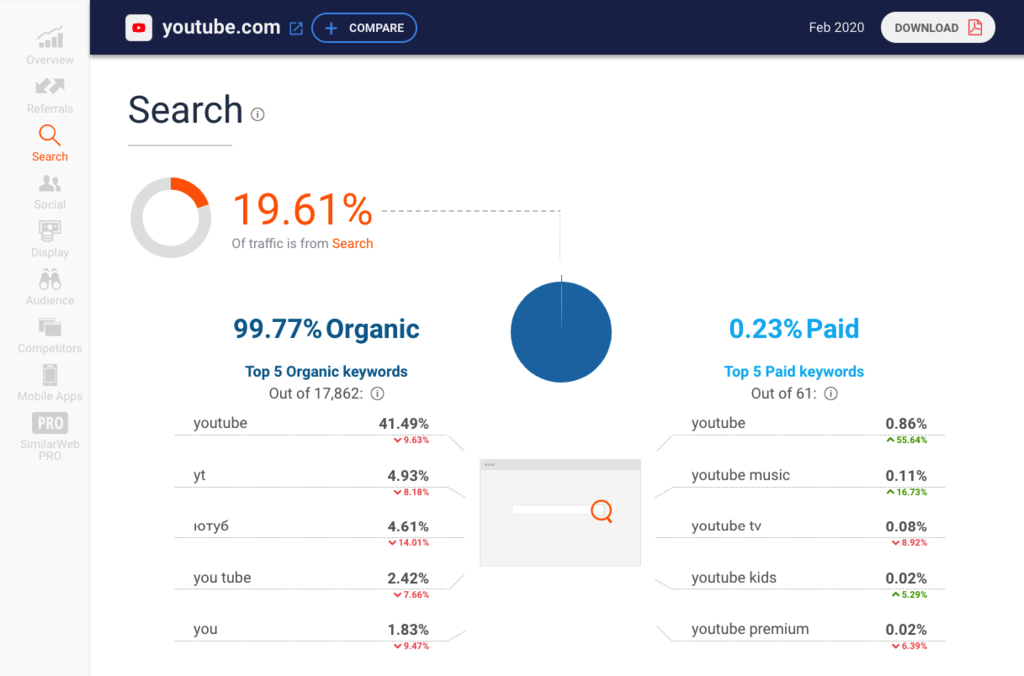
While the free version provides limited statistics, you can still see the reports on the top 5 organic and paid keywords. Once you’re done with the research, you should be able to see a much clearer view of what content your blog needs.
4. Create a content plan
Open a spreadsheet and brainstorm potential article ideas. Start with broader topics and make your way down to more specific branches. If you’re well-seasoned in a particular area, prioritize it.
Notable results will not come immediately, so patience will be your new best friend. Try to set deadlines for publishing articles and monitor your overall progress.
Aim to find the balance between quality and quantity. Then, stick to your plan and leave some time to reflect on the results.
5. Set up social media platforms
Building an online presence is important and sometimes daunting, luckily social media platforms make this task much simpler.

Firstly, social media platforms will increase user engagement. You can notify people about new articles, plans, and updates.
It’s also an amazing way to get acquainted with your readers. A crucial mistake that many new projects make is ignoring their audience and their needs.
But with Facebook and Twitter profiles in place, you can receive feedback from your readers directly. And as you continue to grow, you may run into business offers or similar opportunities.
Depending on the content that you provide in your blog, social media platforms may even attract new readers. It’s not only about gathering your existing audience. As people share your content, more and more people will be tempted to check it out.
6. Do guest posts
After you launch your blog, one of the toughest tasks will be making people notice it. Numerous competitors will stand in your way and you’ll need time to make it to the top search results on Google.
However, there are ways to make this journey less bumpy, and doing guest posts is one of them.
The basic idea is to publish a content piece with a link to your blog on another website. The biggest benefits that you will get are:
- Boost in SEO due to links from other websites.
- A slight increase in direct/organic traffic.
If that’s something you’re willing to try, check out this in-depth guest blogging case study by Ahrefs.
7. Implement Google Analytics
Monitoring your traffic is an essential part of building a successful blog.
Knowing your audience and what they want from your site will put you a few steps ahead.
And the best tool to take care of this job is Google Analytics. It tracks your visitors, their habits, various social metrics and more.

What’s more amazing is that this software is free. This means that every web user can easily find out more about their readers.
If you plan to start a blog using WordPress, our detailed guide on how to set up Google Analytics is ready to go.
8. Submit new content to Google
Thousands of new websites are created daily. And the number of new posts and articles are in the millions.
With that much action going on, it may take time before Google and other search engines start indexing your new content. But there’s a shortcut you can take to speed things up.
Adding your site to Google Search Console will give you the opportunity to:
- Monitor your blog performance.
- Get alerts in case of sitewide errors.
- Use various testing tools.
- Access in-depth learning material.
And most importantly, you’ll be able to submit new blog posts and force Google to crawl them.

9. Build backlinks
If you want to reach the top results of Google search, backlinks are something that you’ll need to take seriously.
In fact, it’s one of the most important ranking factors that Google takes in mind when evaluating websites.
While new blogs should focus on producing content and improving existing pages, there will come a point when you’ll have multiple top-notch content pieces at hand.
More often than not, even the highest quality content may not see the light of Google SERPs if you don’t work on your backlink profile.
Luckily, there are many proven ways to get them. Here are good resources to start with:
10. Patience is the key
One important thing to remember is: starting a blog is a long-term investment. Just as with any new activity, you’ll need effort and time to see any notable results.
First and foremost, it will take time before Google starts recognizing the existence of your blog. Many SEO specialists claim that there’s a period of time that needs to pass before your content starts making an impact (also called Google Sandbox).
So if you really want to succeed, arming yourself with patience is the way to go. Hope for the best, but be prepared for the worst, and you’ll surely get there.
11. Add CTA (Call to actions)
This can be anything that you want your readers to act upon. Whether it’s subscribing to a newsletter on your mailing list, reading another post, buying a product, an upgrade, etc.
Each blog post will benefit from having at least one CTA. Even if it is something as simple as asking your readers to comment on the post.
12. Check your blog’s load times
You want to make sure that your blog’s page is loading in an acceptable amount of time. Load times are not only a factor in ranking in search results but its a quick way to lose potential audience or readers if your site won’t load, or loads too slow.
You can see how fast your blog loads using page speed testing tools like Pingdom or GTmetrix.
If you need to optimize your page to speed things up, check on your image sizes, consider a caching plugin, or pick a faster web host.
13. Maintain your site
Keeping your site up to date can make or break a successful blog. When given the choice of reading an article on a site with errors and plugins that don’t work, or a flawless working blog, most will go for the better.
Make sure to update your CMS software, as well as your plugins and themes. Create a schedule to back up your site and check for broken links in your older posts. Optimize your database and keep your articles up to date with the correct information.
14. Content Audits
In addition to maintaining your site, content audits are a great way to give your blog a facelift. It is a good idea to check your past blog posts on a regular basis. Keep improving them so your reads can have the best and correct information at all times.
You can consolidate posts that are similar, as well as delete posts that you don’t want anymore. Setting up 301 redirects or other error pages can be done as well. And don’t forget about removing all dead links.
Blogging Tools and Resources
Uploading blog posts regularly can be a tedious job, especially when you are looking for images, editors, or organizational help. But don’t worry, there are a number of blogging tools and resources that can help ease the process.
Images
Images are beneficial for your blog. Other than giving visual appeal to your posts to lure in readers, they can also help with SEO.
Depending on the platform you use to build your blog, you can add titles, descriptions, tags, and alt text to your images. Don’t forget to insert relevant keywords in order for search engines to pick them up.
If you have a limited photo library, Unsplash has over a million high-resolution images that are free to download and use. The photos are all available for personal and commercial use. No signup or paid-plan upgrades are needed.
The same goes for Pixabay and Life of Pix. You’ll be able to go through all three websites and find the relatable images for your blog.
One disadvantage of using free photos, however, is that other websites might use them as well. If you prefer authentic premium pictures, Death to Stock is the place to go.
You can buy individual photo packs ranging from $99 for personal use to $299 for a commercial license. Or, subscribe to the Brand plan for $12/month paid annually with a 14-day free trial. You will get different packs every month and a do-what-you-want license.
Design resources
Having a visually attractive blog is essential if you want to grab your reader’s attention at first glance. Thankfully, nowadays you don’t need prior skills or knowledge in design to build a stunning and engaging blog.
Canva
A recommended design tool that is free for you to use is Canva. Before you start, visit its design school where you can find free courses and tutorials on the basics of design and brand building.
The admin dashboard and editor are user-friendly. Various templates are also provided — posters, logos, infographics, websites, social media posts, and more. You can also start from scratch if you want.
Every element is customizable and you’re given creative freedom, so the possibilities are endless. You can also use Canva anytime and anywhere as it has a mobile app. However, the editing options are not as expansive as the desktop version.
If you ever need help using Canva, whether on your computer or mobile device, there’s a support page with complete explanations.
The free plan comes with 1GB of storage plus thousands of templates, photos, and graphics. You can also export your designs as PDF, PNG, and JPG formats. Team collaboration is possible as well.
Visme
Visme is another content designing tool alternative. It’s versatile and lets you create engaging posts within minutes, from infographics, blog banners, social graphics, charts, videos, and more.
Thousands of customizable templates, icons, and millions of stock photos are provided. Plus, the editor is intuitive. Visme uses a simple drag-and-drop feature and granular control. Embedding external content and animating your designs are possible as well.
You can make up to five projects with the free plan and get 100MB of storage. Templates are limited, and you can only download files as JPG. The premium plans range from $14 to $25/month paid annually if you ever need additional resources.
The Noun Project
For icons, the Noun Project is a great place to start. It has a pool of over two million icons. No sign up needed. Simply search the type of icon you need.
You can download black and white icons with a Creative Commons license for free. Or, purchase the icons you want for $2.99 each, to get the royalty-free license.
Pixlr
Pixlr is an online photo editor with AI-powered tools, giving easier and faster edits. One example is the AI Cutout that can remove backgrounds and unwanted parts from your images in just one click.
The platform comes with two types of editors. Pixlr X is for those who are new to photo editing and prefer a straightforward interface with playful and quick edits.
For advanced and detailed image editing, you can go for Pixlr E. It is sleek with intuitive navigation.
A mobile version of Pixlr is also available so you can edit images on the go. It has a free plan with limited resources, basic editing tools, and ads. Upgrade to its Premium plan for $3.99/month to get advanced features and no ads.
PicMoney
PicMonkey is not just a premium photo editor but also a design tool. It lets you touch up your images, add text, and apply filters or effects. All changes made are automatically saved online.
It also has thousands of design assets such as graphics, fonts, and textures, which you can use to create logos, ads, announcements, infographics, and more. If you don’t want to create them from scratch, there are customizable templates and pre-set blank canvases to start with.
PicMonkey is also available on iOS and Android, making it accessible anywhere and anytime. The tool will cost you at least $72/year with a seven-day free trial. It comes with 1GB of cloud storage, a vast library of top-tier fonts, plus premium effects, tools, and templates.
Google Docs and Google Calendar
It can be difficult for a team to manage and contribute to a single blog. A useful collaborative tool is Google Docs. It’s a free online word processor where you can create, edit, and share documents.
Team members can leave comments or suggestions on the same document in real-time. There’s also a revision history feature where you can see all changes made to a document and by whom. Plus, it has an offline mode and is available on iOS/Android so you can write on the go.
Google Calendar is also handy for creating an editorial calendar and timeline. You can set up deadlines or other schedules and share them with your teammates. It’s also integrated with Hangouts and organizing a meeting is just a click away.
Screenshot apps
When writing reviews or tutorial blog posts, there are times when you need to take screenshots to back up your explanations.
Lightshot
Lightshot is a free screenshot software available for Mac, Windows, Chrome, and other popular browsers.
It’s very straightforward to use. You can take screenshots of any size with just a couple of clicks and copy them to the clipboard or save them. The tool comes with an editor as well.
FastStone Screen Capture
If you need a screen video recorder, FastStone Screen Capture might be of use. You can record on-screen activities with speech and mouse movements and save them as compressed WMV files.
Screen captures can also be saved into eight formats, including PNG, JPEG, PDF, and GIF. The tool provides a feature-rich editor that can add annotations, watermarks, apply effects, and more. Uploading your files straight to your blog is possible as well.
However, FastStone Screen Capture only has a 30-day free trial, and the lifetime license costs $19.95.
Snagit
Snagit is also a premium solution. It has a unique scrolling screen capture that you can use to capture a vertical or horizontal scroll of long web pages or messages. The tool supports screen, webcam, and audio recording. You can trim the clips or turn them into animated GIFs.
Not only can you extract text from screenshots, but editing the text is also possible. Replace the words, plus change the colors, size, and fonts without redesigning the image.
This screen capture and recording software offers a free trial for 15 days and a one time fee of $49.95.
Spell check and grammar
To attract people to read your blog posts, you need to provide readable and high-quality content. It is important to be sure you are free of spelling and grammar mistakes. Long and hard to understand sentences should be simplified as well.
Grammarly
Grammarly is one of the most popular writing assistance programs out there. Its AI-powered tool can correct your mistakes and improve your writing style in minutes. Grammarly is very simple to use, just copy and paste your text and it’ll do all the work for you.
From simplifying wordy sentences to missing articles, it can notice even the tiniest fault, and you’ll be able to see suggestions on how to fix it. Explanations are also given with the intention for you to understand and not make the same mistakes again.
The tool can be integrated with any word processor, and you can install it on your web browser to use for your email and social media.
You can use the service for free, but it only checks spelling, grammar, and punctuation. By upgrading to its Premium plan for $11.66/month, you can have your clarity, engagement, delivery of content, and plagiarism checked.
Ginger
Ginger checks your spelling, grammar, punctuation, and gives suggestions on different ways you can phrase your sentences. Word predictions will also pop up as you write.
To get a different perspective, listen to how your content sounds using the text reader. Practice sessions based on your mistakes are also provided so that you can improve along the way.
Other than that, Ginger can translate your text to 40languages. It’s available on Safari, Chrome, Mac, Windows, iOS, and Android keyboard.
You can use its grammar and spell checker as well as its proofreader for free. But there’s a 450 character limit. To use the full software, it costs $7.49/month billed yearly.
Hemingway Editor
Hemingway Editor is a great site to make sure your post is readable and understandable.
Its free online version detects adverbs, passive voice, phrases that have simpler alternatives, plus hard and very hard to read sentences. A readability score based on grades is also displayed at the top-right corner of the page.
There’s a desktop Premium version priced at $19.99. It lets you use Hemingway without an internet connection. You can also publish your edited posts straight to Medium and WordPress, or export it to any word processors.
Online Correction
OnlineCorrection is another free tool that highlights basic and simple grammar errors. It offers suggestions on how to edit them as well, or you can set it to auto-correct.
Other than English, it supports seven other languages such as German, French, and Russian. It even includes their dialects. However, keep in mind that there’s a character limit.
Organized with Team
If you have a team working on your blog, it’s essential to communicate regularly with them and track their progress.
Slack
Slack is a great communication tool that has a web, desktop, and mobile version. It supports instant messaging either for private chats or team channels. However, the interface may take some time to get used to due to its many settings and options.
Through Slack, you can share various files from your computer or Google Drive. Screen sharing plus audio and video calls are available as well. Notifications can also be personalized based on your needs.
What’s more, Slack can be integrated with over 2000apps, including Gmail, Trello, Google Calendar, and Office 365. Your data and information is protected using two-factor authentication and SAML-based single sign-on (SSO).
The free version has enough features to get you started, such as unlimited channels, one-on-one calls, and file sharing. If you need extra storage, group calls, security, and more, the Standard plan costs $6.79 per person/month.
Asana
Asana is a collaboration tool with a visually appealing dashboard. It supports real-time communication and multiple workspaces. The drag-and-drop feature is also used for easy navigation.
The platform lets you create a to-do list and assign tasks on boards. To make an editorial calendar and track progress, you can use the Timeline and Calendar. There’s also Workload, where you can see each member’s tasks.
It supports integration with many apps such as Slack, Office 365, Power Bi, Tableau, and more. Automation is also used to save time by simplifying processes and reducing errors. For security, Asana is SOC 2 Type IIcertified.
You can collaborate with 15 people, at most, for free. However, to get advanced reporting and management tools, upgrade to the Premium plan for $10.99 per user/month with a 30-day free trial.
Trello
If you’re looking for a project management tool with online collaboration, Trello is the solution. It’s based on boards, lists, and task cards with a drag-and-drop feature. Also, the user interface is intuitive.
You can create boards from scratch or use a template. They can be set to private, team, organization, and public. Moreover, you can personalize your boards’ background and color. Team members can be invited through their usernames, links, and emails.
Cards can be labeled, have checklists, attachments, and due dates. Assigning members to cards is just a simple click. There are add-on integrations and power-ups as well. Connect Trello to your Google Drive, Slack, Dropbox, and more.
It has a freemium version with unlimited personal boards, lists, and cards. For unlimited team boards and power-ups, you will have to sign up at least for its Business Class that costs $9.99 per person/month.
Online groups
As a blogger, it’s smart to engage with your readers and followers. Creating online groups for your blog is an excellent method to start a community and interact with them.
At the same time, you can share your blog and encourage people to visit them. Plus, you might get more insights about your target audience.
Facebook Group
Kick things off with a Facebook group. By 2021 it’s expected that the number of global Facebook users will rise to 1.69 billion. So, if your group is active and engaging, it’s more likely that your posts will show up on other people’s feeds.
Keep in mind that there are three privacy settings for Facebook groups. You’ll either want to make it Public or Private and Visible.
With Public, anyone can join or see the group’s posts and activities. There’s a chance that your blog will attract new readers and followers. However, you’ll have to keep an eye on what’s happening in the group and make sure that the discussions are about your niche and blog.
If you choose Private and Visible, you will have to manually accept members, and only they can see what’s happening in the group. There’s more control, but don’t worry, your group will still pop up on searches.
LinkedIn also lets you create groups. Though the platform is not as big as Facebook, LinkedIn has around 690 million users and is still growing.
Since it’s a professional platform, not only will you get potential readers, but companies in the same industry might also be interested in collaborating with you.
Other than that, LinkedIn offers community management features. Once every week, you can send an update email to your members. Plus, they will get a daily or weekly digest of the group activities.
There’s also the Manager’s Choice, where you can pin certain discussions to the top of the group.
Reddit is an excellent place to share your blog posts. With over a billion monthly visits, it’ll give you the exposure that can generate traffic to your blog.
The platform consists of millions of communities of various topics called subreddits. Anyone with an account can start one, but do remember to follow its content policy.
As a moderator of a subreddit, you can filter the types of posts that are allowed on the sub. Removing inappropriate content and banning users from the community, if needed. What’s more, you can even personalize the sub’s appearance.
However, keep in mind that unlike other social media, Reddit has a downvote system. It can be disadvantageous as many can dislike your content as well.
Social Media Scheduling
One way to promote your blog posts is through social media platforms. However, it can be quite overwhelming if you’re also managing several social accounts in addition to your blog.
Hootsuite
Hootsuite is a solution where you can manage various social profiles on one platform. It lets you schedule and publish posts to the right channels at selected times. With this tool, it’s also possible to track social ad campaigns and monitor their performance.
There’s a free plan, but it only allows you to manage three social profiles, schedule up to 30 posts, and integrate Hootsuite with basic apps.
If you have ten or more social accounts, you will need to upgrade to one of its premium plans. The price starts at$19/month with a 30-day free trial. You can publish unlimited posts and performance metrics for insights.
Buffer
Buffer is an alternative. You can create content for various social networks and publish them from one simple admin dashboard. It lets you set a schedule for each social account, and get a glance of your timeline through the calendar.
This tool is also useful for Instagram marketing. You can include a first comment while scheduling posts, and it can help drive traffic to your blog from your Instagram bio. Reminders will also pop up when it’s time for you to publish.
Though it doesn’t have a freemium version, you can try it for free for 14 days. No credit card needed. The basic paid plan will cost you $12/month billed yearly. With it, you can manage eight social accounts and schedule 100posts for each.
Stay Focused
Writing can be a tedious job when done for a long period of time. You can get sidetracked from your schedule or original plan due to various distractions. Not to worry, some tools can help you manage your time effectively.
E.gg Timer
E.gg Timer is a free and straightforward online countdown timer that is handy for time management.
When writing, it’s important to take break intervals. This tool lets you set custom timers or use the readymade ones — one hour, the Pomodoro system, morning routine, and more. Options are also available for alert types, volume, and pop-up boxes.
Toggl
For a comprehensive time management and productivity tool, Toggl is an excellent choice. It not only tracks time, but it can also be used as an editorial calendar.
With its freemium plan, you can set one-click timers for efficiency, fix reminders, and integrate Toggl with over 100 online apps, including your calendar. It also has a reporting system that lets you export your tracking data to PDF, Excel, and CSV files.
There’s a project dashboard as well where you can create project timelines and track their progress. What’s great is that, other than for desktop, Toggl is also available for iOS, Android, and Chrome.
Post a Comment